







This calculator makes it easy to offer financing options to prospective buyers. Long term payment plans and domain financing are becoming popular ways to close the gap in domain name negotiations. The creator of Domaining has created a handy ... Continue ReadingLeave a Comment

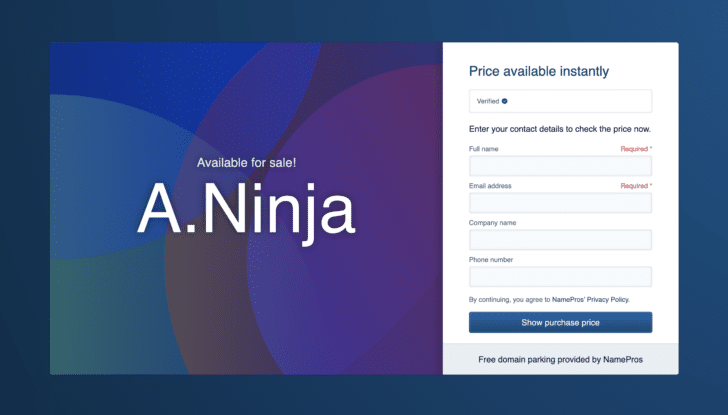
NamePros has a brilliant idea with its new “buy now” feature
· ServicesThis approach could be the best of both worlds. NamePros is introducing a new feature for its free "for sale" parking pages, and I think it's brilliant. Domain investors typically choose between "buy now" and "make offer" landing pages. The ... Continue Reading8 Comments

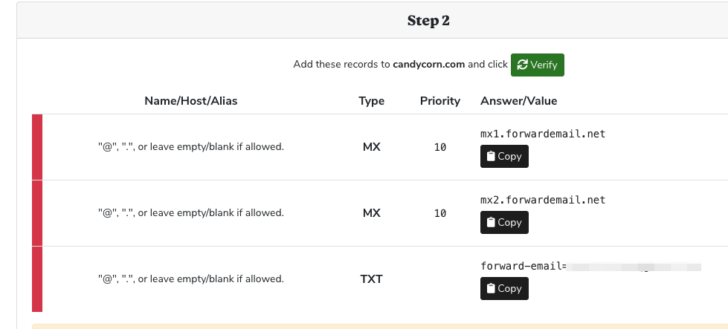
How to set up catch-all email forwarding at Squadhelp
· ServicesIt's easy to find out who is sending email to your parked domain names. Squadhelp recently enabled custom DNS settings on domain names. When you point your domain names to Squadhelp's nameservers, you can now add MX and TXT records to those domain ... Continue Reading5 Comments
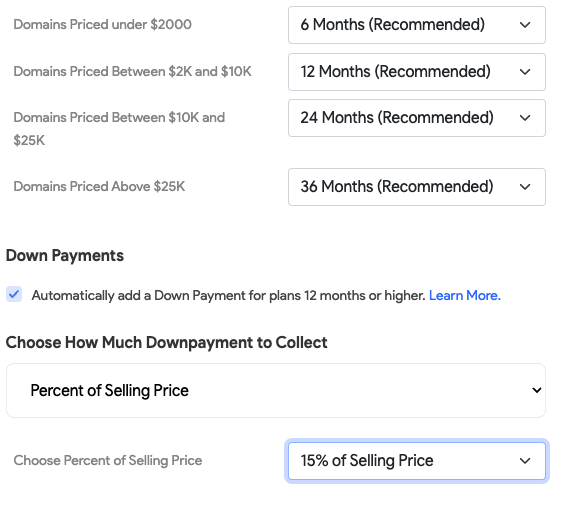
Squadhelp adds down payment option for lease to own
· ServicesAsk buyers for a down payment to reduce the chances of buyers abandoning long-term payment plans. Offering long-term payment plans for domain names is a great way to increase sales. However, sellers can be frustrated when buyers stop making ... Continue Reading2 Comments


Tucows partners on web3 company Orange Domains
· ServicesOrange Domains is trying to connect the DNS with Bitcoin Naming Service. Domain name registrar Tucows (NASDAQ: TCX) has thrown its hat in the web3 ring as a partner in a new company called Orange Domains. Orange Domains plans to expand the ... Continue ReadingLeave a Comment

5 new top level domains enter early access today
· ServicesInternet Naming Co. introduces five new domains today. Five new top level domain names are available for registration starting today: .diy, .food, .living, lifestyle, and .vana. Internet Naming Co. acquired the unlaunched top level domain names ... Continue ReadingLeave a Comment

Radix brings LinkLab out of beta for link-in-bio tools
· ServicesUsers can replace ugly link-in-bio URLs with branded domain names. New top level domain name company Radix has released LinkLab out of beta. LinkLab is a tool for people to upgrade their link-in-bio URLs with branded links. For example, ... Continue ReadingLeave a Comment

It’s now free to connect a real domain to Ethereum Name Service
· ServicesSmart contract enables Gasless DNSSEC to import domains to use on ENS. Ethereum Name Service (ENS) has implemented "Gasless DNSSEC", making it easier to use real domain names with ENS. ENS is a blockchain-based system that acts as a web3 ... Continue ReadingLeave a Comment
How to change Afternic listings to lease-to-own in bulk
· ServicesHere's how you can add lease-to-own to multiple domain names at one time. Last year Afternic introduced lease-to-own (LTO) payment plans to Afternic listings. After attending the ICA meeting in Las Vegas last week, one of my takeaways was to ... Continue ReadingLeave a Comment

Identity Digital gets patent for “Assisted setup of domain name registry”
· ServicesPatent describes method for setting up a domain name registry. The U.S. Patent and Trademark Office has granted patent number 11,870,750 (pdf) to Identity Digital for Assisted setup of domain name registry. The patent describes a process for ... Continue Reading1 Comment


