







Google opens up a wealth of organic search data for your web sites. Use it.
Google recently expanded the organic search data it provides to web site owners who use Webmaster Tools. Now you can see rich data about where your web site has ranked for key terms, how many times it showed up in search results, and the click-through rate for each position. Here’s an example:
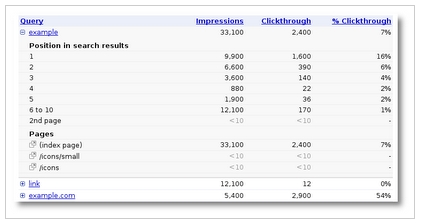
For years, SEOs have discussed the relative number of click-throughs you get at different positions on a search page. Now you can see exactly how much more traffic you can get by moving up a position. If you have a high traffic keyword with a click-through rate of 40% in position one and only 5% in position two, that’s a keyword you should optimize for. If you have a high traffic keyword at 6% in position one and 5% in position two, you should prioritize that lower.
Log in to your Google Webmaster Tools account to check it out.




How do you do a search for just the keywords you enter?
It wants to add a whole bunch of keyword ideas. I see no way around this.
If you enter your website, can others see the data?
Webmaster Tools only works for your web site. You must authenticate your web site before you can see stats for it.